Alagus Print Admin4.0
Publisher Description
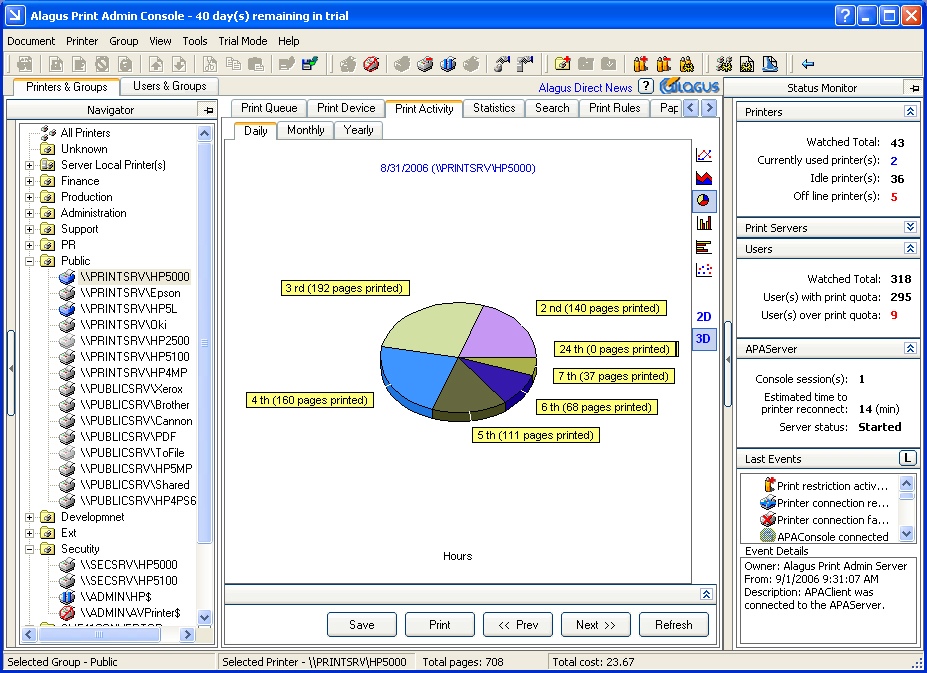
Alagus Print Admin 4.0 is a complex software system for managing the entire print process in your organization. This product is the ultimate print-ruling solution, which means no less then satisfying all possible requirements of the print control software.
Alagus Print Admin 4.0 offers you many solutions in one product:
Print Audit Audit the customers print activities and devices;
Print Quota Limiting the printing by setting print quota;
Printer Printing Management Full management of the printers and print documents;
Print Monitoring Track, control and observation of the events in the print process;
Printing Analysis Statistics and reports on the actual print activity.
Alagus Print Admin 4.0 is a server-based application, which allows system administrators to manage print process centrally.
There are many ways to manage the print process by using Alagus Print Admin 4.0. This is only a short description of them.
Printer management. Management of the printers queues. Manipulates print devices and printer environments.
Document management (Pause, Resume, Cancel, Restart, Copy/Paste, Save/Load, Preview)
Print quotas Sets print quotas for one user or a group of users
Print rules Sets rules for printing. Printing prohibition depending on some criteria (file size, number of pages, keyword from the document title or specific file extension)
Print priority Sets priority of the print documents depending on the owner
Print activity Shows the print activity for a certain period (day, month, year) in a chart. Print activity may be shown for one user, a group of users, one printer or a group of printers or all of them.
Track and store into the database the information for every printed document (username, printer, document title, data, time, pages, size, cost etc.)
Statistics and reports Makes cross reports about the number of pages printed per user/user group/all as well as about print quotas, Print rules etc.
About Alagus Print Admin
This Printer program is available in English. It was last updated on 29 September, 2026. Alagus Print Admin is compatible with the following operating systems: Windows.
The company that develops Alagus Print Admin is Print Management Software. The latest version released by its developer is 4.0. This version was rated by 2 users of our site and has an average rating of 3.0.
The download we have available for Alagus Print Admin has a file size of 15.7 MB. Just click the green Download button above to start the downloading process. The program is listed on our website since 2008-03-28 and was downloaded 180 times. We have already checked if the download link is safe, however for your own protection we recommend that you scan the downloaded software with your antivirus. Your antivirus may detect the Alagus Print Admin as malware if the download link is broken.
How to install Alagus Print Admin on your Windows device:
- Click on the Download button on our website. This will start the download from the website of the developer.
- Once the Alagus Print Admin is downloaded click on it to start the setup process (assuming you are on a desktop computer).
- When the installation is finished you should be able to see and run the program.
